
Home / CIMARA Core / Rentals and Reservations for NCR Counterpoint Retailers
CIMARA Core
Rentals and Reservations for NCR Counterpoint RetailersDesk rentals and reservations, with merchandise on the same checkout.
A rental desk needs named resources, availability windows, pickup, return, and deposits. CIMARA Core handles that workflow beside the retail system you already run. CIMARA connects to the systems you already run, with integrations like NCR Counterpoint, and works with your existing products and customers, so you can start today and move at your own pace. CIMARA does not require Counterpoint. Online booking via the embeddable Website Commerce component is in active deployment with early customers. Walk-up reservations continue to be made at the counter.
CIMARA POS buyer guide
Keep the retail file you already know
On NCR Counterpoint, you do not have to create a second retail item file or abandon the reporting your team already knows. CIMARA Core manages the reservation and resource workflow at the counter.
- On NCR Counterpoint, retail items, pricing, inventory, and reporting can stay in Counterpoint, so you can start today and move at your own pace
- CIMARA resource availability, reservations, and fleet activity
- One completed customer transaction posted downstream
CIMARA POS buyer guide
Avoid a second drawer and end-of-day reconciliation
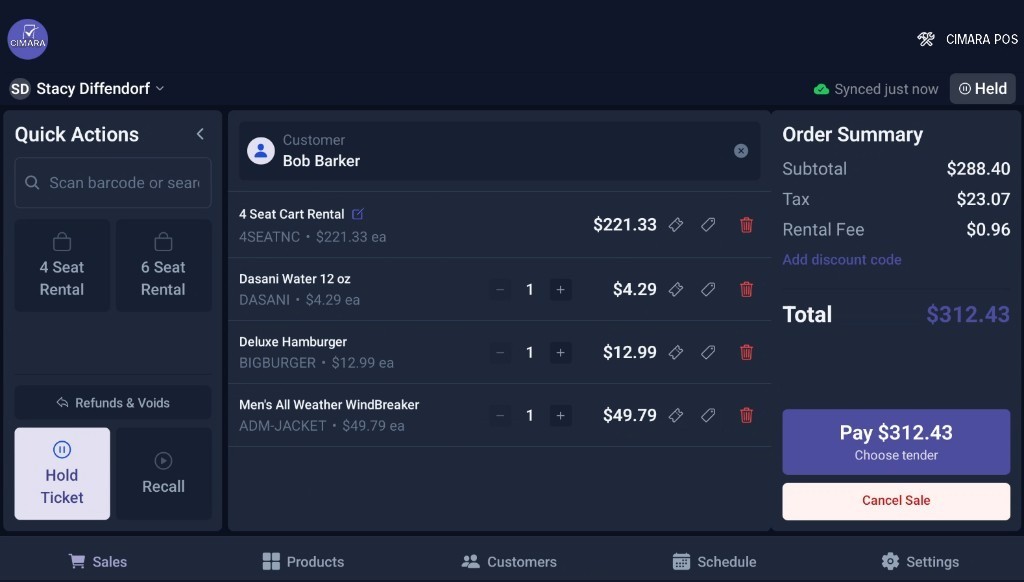
A guest can reserve equipment and add merchandise or food during the same visit. CIMARA keeps each line’s operational logic intact while presenting one cart and one payment to the customer.
CIMARA POS buyer guide
Start with the process you already run
Implementation begins by mapping your resources, reservation windows, deposits, return process, and add-ons.
Questions to ask
Before selecting a rental and reservation system
How does CIMARA Core work with NCR Counterpoint?
CIMARA runs on its own and connects to NCR Counterpoint. Reservation and mixed-sale workflows run in CIMARA Core, and the completed sale can post to Counterpoint.
Does CIMARA create a separate inventory file?
Not if you are on NCR Counterpoint. Retail inventory, pricing, and reporting can stay in Counterpoint instead of a disconnected merchandise file.
Can a rental and merchandise share one checkout?
Yes. CIMARA Core composes resource rental and retail lines into one customer transaction before the completed sale posts downstream.
Continue researching
CIMARA POS buyer guides
Equipment rental software
Read: Equipment rental softwareHow mixed transactions work
Read: How mixed transactions workGet started
See it with your fleet.
Book a demo and we will walk your rentals, add-ons, and checkout on one checkout.